Qustodio Review (2026): Pricing, Reviews, Pros and Cons
Features, pricing, what customers report, pros and cons, and alternatives · Updated
Qustodio is parental control software that filters websites, blocks apps and games, sets daily time limits and reports what a child did on a phone, tablet, computer or Chromebook. It covers more device types than most rivals and has a genuinely useful free plan for one device. Its public review record is mixed: the App Store rates the parent app 4.2 out of 5, and its Trustpilot profile sits at 2.5.
Key takeaways
- Platforms: Windows, Mac, Android, iPhone, Chromebook and Kindle Fire, with the fullest feature set on Android.
- Free plan: web filtering, safe search and 7-day reports on one device, permanently.
- Price: Basic $59.95/year for up to 5 devices, Complete $104.95/year for unlimited family devices.
- Reviews: 2.5 out of 5 from 692 Trustpilot reviews, 4.2 out of 5 from 9,300 US App Store ratings.
- Main complaints: blocking rules not taking effect and children removing the app.
Contents
Verdict
Qustodio is worth it if you need one parental control subscription across many device types, including Windows, Mac, Android, iPhone, Chromebook and Kindle. Skip it if reliable blocking is your priority, because its 2.5-star Trustpilot record across 692 reviews is the weakest among the major parental control apps.
Key features
- Web filtering: block or allow site categories, alerts when a blocked site is attempted, safe search.
- App and game blocking: named apps and games, or whole app categories, on paid plans.
- Time limits: daily allowances that vary by day, scheduled restricted times, a control that pauses the internet.
- Location: live location, location history, alerts when a child arrives at or leaves a saved place.
- Monitoring: browsing history, YouTube viewing, social message alerts, calls and messages on the top plan.
- Alerts and reports: AI-powered search and message alerts, gaming voice alerts, a panic button on the top plan, daily and weekly reports covering 7 days free or 30 days paid.
What Qustodio does
Qustodio installs a kids app on each child device and is managed from a parent app on iPhone or Android, or from any web browser. Rules are set per child rather than per device, so one child's rules follow them across a phone, a laptop and a Chromebook.
Filtering works by category: each category is allowed, alerted on or blocked, and individual sites can be added. Paid plans add app and game blocking, by name and by category, plus time limits for the whole device or for individual apps and games. Monitoring is report-based rather than a live transcript: Qustodio shows what was browsed, what was watched on YouTube and how long each app was used, and sends alerts when its AI flags a search or a message.
What you get on each platform
Qustodio supports more device types than most parental control products, but the feature set is not the same on each. Qustodio documents the differences.
- Android: the fullest version. Filtering, app and game blocking, time limits, location, calls and messages, and social alerts covering WhatsApp, Instagram, TikTok, Snapchat and X.
- iPhone and iPad: filtering, app blocking, time limits, location. Calls and messages monitoring needs a Windows or Mac computer to set up, and social monitoring is limited to WhatsApp and Instagram alerts.
- Windows and Mac: filtering, app blocking, time limits, reporting. No calls or text message monitoring.
- Chromebook and Kindle Fire: Chromebooks that run Google Play apps, and Fire tablets on Android 8 or FireOS 6 and later.
- Minimum versions: Windows 10, macOS 10.15, Android 9, iOS 16. The parent app needs iOS 16, Android 9, or any web browser.
Qustodio's own guidance on a shared Windows or Mac computer is to give the parent an administrator account and the child a standard account. On iPhone and iPad it offers a desktop tool, Qustodio Advance, installed from an "Install anti-tampering" button in the parent dashboard and intended to stop a child removing Qustodio.
The free plan
Qustodio's free plan is not a time-limited trial. It covers one device permanently and includes safe search, web filtering, restricted times, the pause-the-internet control and 7 days of activity reports.
What it leaves out is substantial: app and game blocking, daily time limits, location monitoring, YouTube monitoring, calls and messages monitoring, the panic button, every alert type, 30-day reports and premium email support. In practice the free plan is a web filter with a schedule, which may be enough if the concern is what a child sees in a browser on one computer, and is not if the concern is apps, games, screen time or location.
Pricing
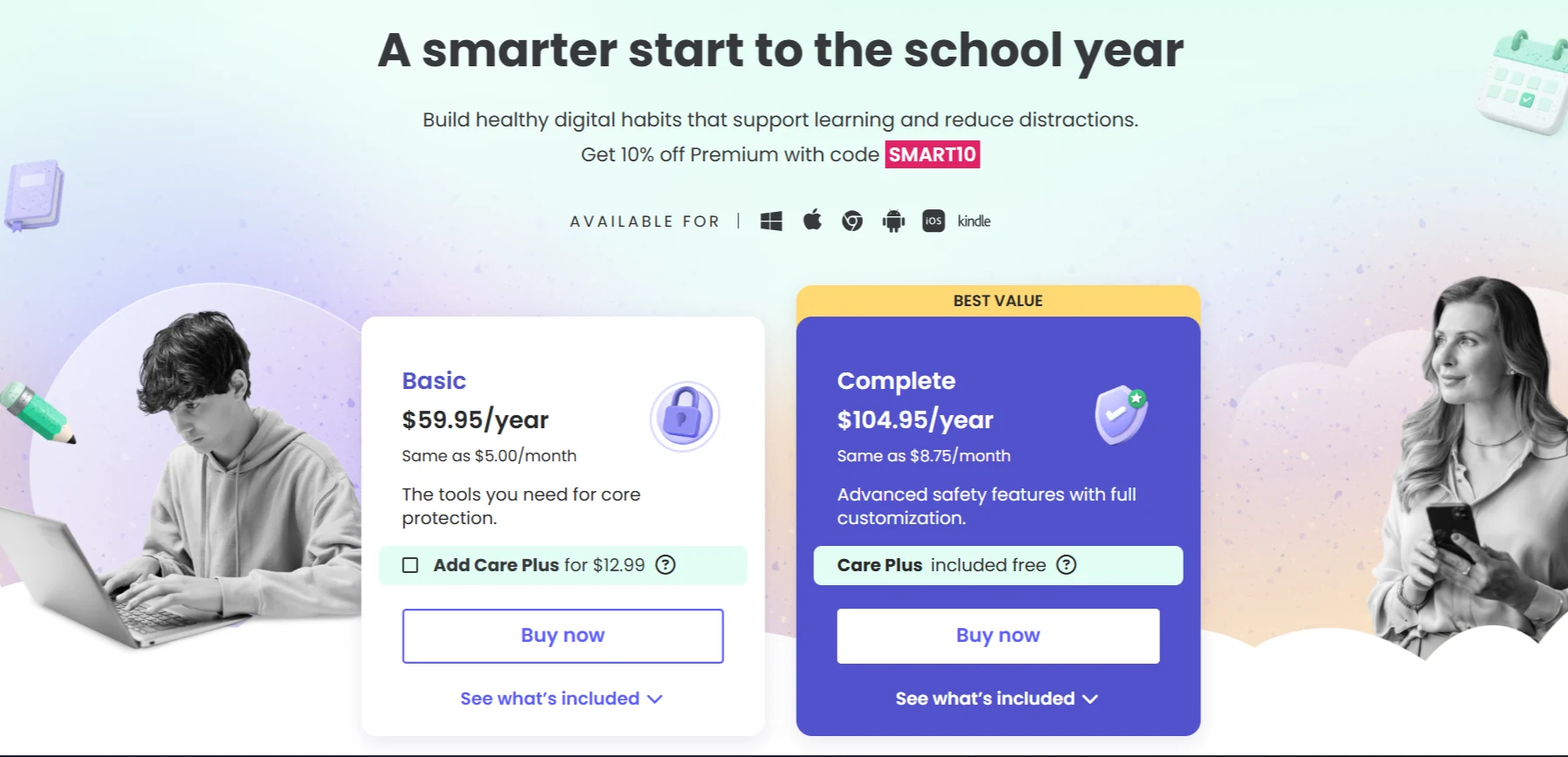
Both paid plans include a 7-day free trial and a 30-day money-back guarantee, and Qustodio sells annual plans only on its website.
Complete adds YouTube monitoring, calls and messages monitoring, the panic button, custom rules for websites, apps and games, priority phone support and Care Plus. Everything else, including filtering, app and game blocking, time limits, location, social monitoring, gaming alerts and 30-day reports, is on Basic too.
Prices bought inside the iPhone app differ from the website. The App Store lists a wider set of tiers, including $54.99 for 5 devices, $94.99 for 10 devices and $99.99 for Premium Complete, so compare before subscribing in-app.
What customers report
Checked on 24 September 2026, Qustodio's Trustpilot profile shows a TrustScore of 2.5 out of 5 from 692 reviews.
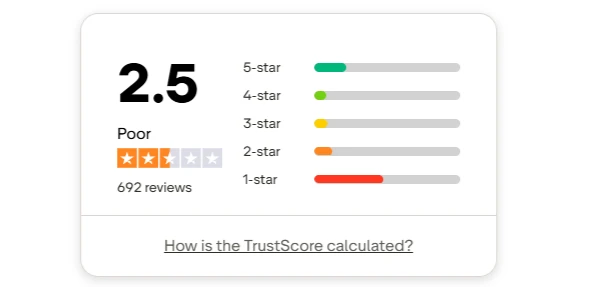
Qustodio's Trustpilot rating distribution, checked 24 September 2026
| Rating | Share of reviews |
|---|---|
| 5 star | 22% |
| 4 star | 9% |
| 3 star | 9% |
| 2 star | 13% |
| 1 star | 47% |
Nearly half the reviews are one star and just over a fifth are five star. These figures move as new reviews arrive, so check the profile for the current numbers.
In the recent reviews, these complaints recur most, in order of how often they appear:
- Blocking and app rules not doing what was set. One reviewer wrote on 22 September 2026: "When I went to block things they didn't block even when they said they were."
- Children removing the app or getting past it. A reviewer wrote on 20 September 2026: "My kids figured out how to uninstall this app in less than 24 hours." (How that was done is not described here.)
- Calls and messages monitoring not syncing or showing no data, which is the feature the Complete plan is bought for.
- Bugs, crashes and slow performance in the parent app.
- Price against what the product delivers. A three-star reviewer wrote on 9 September 2026 that the "price for premium is far too high and does not reflect features".
- Support being slow to respond, or not resolving the problem.
Difficulty setting up across several devices appears too, but less often than the themes above. Refund and cancellation problems were not recurring. The praise is consistent as well: ease of setup, a straightforward interface, and filtering and monitoring that does what was expected once configured.
Two things belong next to that 2.5.
Qustodio engages with the criticism. Trustpilot records that it has replied to 98 percent of its negative reviews and typically responds within a week, so most one-star reviews on the profile carry a public response from the company.
Qustodio's own numbers are better. The parent app scores 4.2 out of 5 from 9,300 ratings on the US App Store, where the developer is listed as Qustodio Technologies SL. Qustodio states it protects 9 million families, and displays a Mom's Choice Award 2025, a PTPA award and Trusted Partner status with Internet Matters for 2025.
The gap between 2.5 and 4.2 is normal. App store ratings are usually prompted inside a working app, and review site ratings are usually written after something went wrong. Both are worth reading, and neither is the whole picture.
Pros
- Widest platform coverage: Windows, Mac, Android, iPhone, Chromebook and Kindle Fire on one account.
- Genuine free plan: web filtering, safe search, restricted times and 7-day reports on one device, with no time limit.
- Rules follow the child: settings are per child rather than per device, and Complete has no device cap.
- Strong on Android: calls, messages and social alerts across WhatsApp, Instagram, TikTok, Snapchat and X.
- Documented anti-tampering path: Qustodio Advance on iOS, and a standard child account on Windows and Mac.
- Low-risk trial: a 7-day free trial and a 30-day money-back guarantee on both paid plans.
Cons
- Poor Trustpilot record: 2.5 out of 5 from 692 reviews with 47 percent at one star, checked 24 September 2026.
- Recurring reports that blocking fails: the most common complaint in recent negative reviews is that rules did not take effect, followed by reports that a child removed the app.
- Top-plan feature draws complaints: calls and messages monitoring, which is Complete only, is a frequent subject of negative reviews.
- Free plan is thin: no app blocking, no daily time limits, no location and no alerts.
- Uneven by platform: Windows and Mac get no calls or messages monitoring, and on iOS that feature needs a Windows or Mac machine to set up.
- Annual billing only on the website: monthly billing is not offered on qustodio.com.
Who Qustodio is best for
Qustodio is best for a parent managing several children across a mix of device types who wants filtering, time limits and reports from one subscription, and who is willing to spend time on setup. It fits best where the children are on Android, which is where its feature set is fullest.
It is a weaker fit where the whole reason for buying is calls and messages monitoring, or where the parent wants a product they configure once and never revisit. It is not designed for an adult restricting their own computer: the account holder controls every rule, so an adult who installs it on themselves keeps the ability to change or remove it.
Alternatives
- Bark: parental monitoring that alerts a parent to flagged content in texts, email and social media apps, with its own phone and watch hardware.
- Net Nanny: web filtering, screen time limits and app blocking for Windows, Mac and iPhone, sold per device count.
- Canopy: an AI content filter that removes explicit images and videos from web pages as they load, on Windows, Mac, iPhone, Android and ChromeOS.
- Google Family Link: Google's free parental controls for children on Android phones and Chromebooks, covering app approvals, screen time and location.
- Ascension: a Windows blocker that blocks distracting and harmful content, hard-to-bypass and tracks all usage locally.
Frequently asked questions
How much does Qustodio cost?
Basic costs $59.95 a year for up to 5 devices. Complete costs $104.95 a year for unlimited family devices and adds YouTube monitoring, calls and messages monitoring, the panic button, custom rules and priority support. Both include a 7-day free trial and a 30-day money-back guarantee. Prices bought inside the iPhone app differ from the website.
Is there a free version of Qustodio?
Yes. The free plan covers one device permanently and includes safe search, web filtering, restricted times, the pause-the-internet control and 7 days of activity reports. It excludes app and game blocking, daily time limits, location, YouTube monitoring, calls and messages monitoring and all of the alerts.
What can Qustodio block?
Websites by category and by name, apps and games by name and by category, and the internet as a whole on a schedule or on demand. Daily time limits apply to the device and to individual apps and games. App and game blocking and time limits are on the paid plans only.
Does Qustodio work on Windows?
Yes, on Windows 10 and later. It filters websites, blocks apps and games, applies time limits and reports activity. It does not monitor calls or text messages on Windows. Qustodio's own guidance for a shared computer is to keep the parent on an administrator account and the child on a standard account.
Can a child remove Qustodio?
Qustodio provides tools intended to prevent it, including Qustodio Advance for iPhone and iPad and the administrator account setup it recommends on Windows and Mac. Reviewers on Trustpilot report that children have removed the app or got past it, and it is one of the recurring themes on the profile, checked 24 September 2026. No product in this category should be treated as impossible to remove.
Why are Qustodio's Trustpilot reviews so low?
Checked on 24 September 2026, the profile shows 2.5 out of 5 from 692 reviews, 47 percent of them one star. The most common complaints are that blocks and app rules did not take effect, that children removed the app, and that calls and messages monitoring did not work. Qustodio has replied to 98 percent of those negative reviews, and the same app scores 4.2 out of 5 from 9,300 US App Store ratings.
Is Qustodio worth it?
For a parent who needs one subscription across Windows, Mac, Android, iPhone, Chromebook and Kindle Fire, it covers more ground than most rivals, and the free plan lets you test the filtering first. If calls and messages monitoring is the main reason for buying, read recent reviews of that feature before paying for Complete.
What is a simpler alternative to Qustodio?
Ascension is a simpler alternative for a parent. Kids do not need to be monitored constantly — what matters is that harmful content stays inaccessible. With Ascension you can block adult content and short-form feeds permanently, and set schedules and time limits for entertainment.